Member Management

Hello everyone,

Thank you very much for the role and member permission management interface in the Portal (formerly Book)!
[By the way, in a portal’s URL, you still see the information Book :slight_smile: “…/shared/book/…”]

This is really a great improvement for access rights and information sharing.

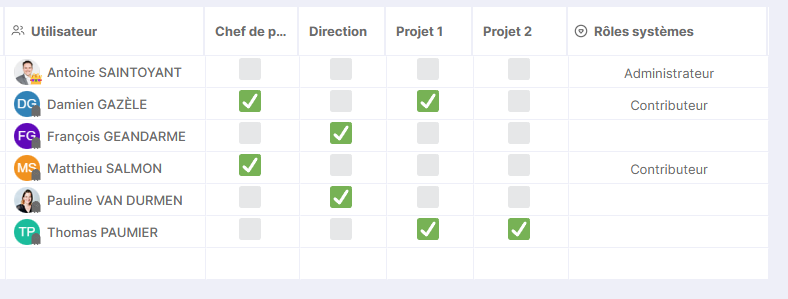
Now, would it be possible to add an additional tab after “Permissions by Role” and “Permissions by Member” like “Member Management” with a possible view like:
image
Perhaps by tilting the Business Roles to limit column size.
I put the System Roles in a dropdown menu since it’s a single selection.

And as a bonus, could we imagine seeing this “Business Roles” management applied to the Workspace?
This would allow for a better overview when you start having a certain number of boards in the same space.

What do you think?
Hello Antoine,

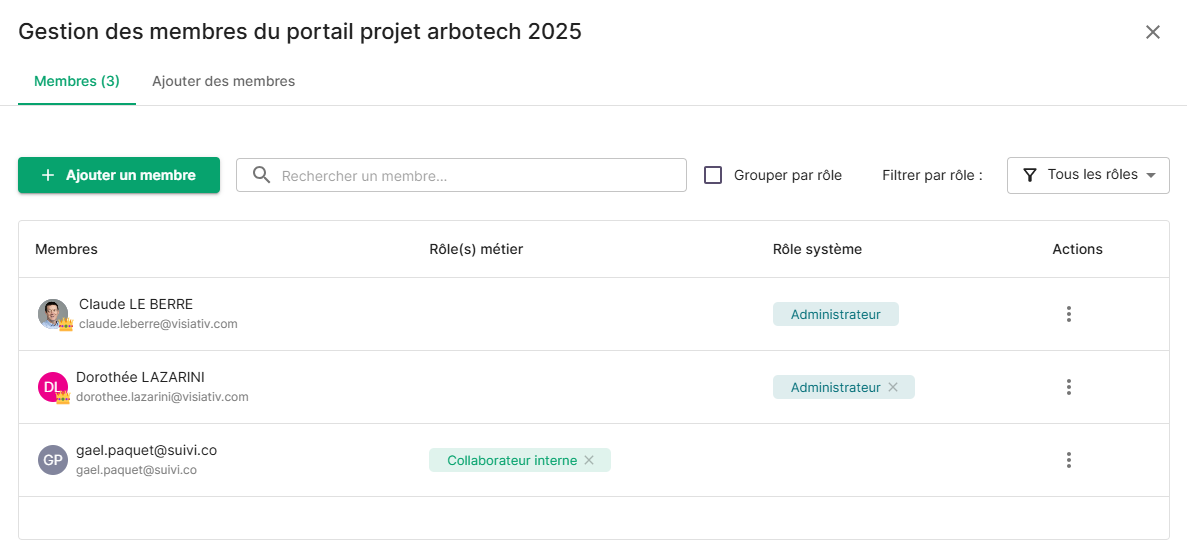
You can find user role assignments in the invitation management section, which you can access by clicking on ‘invite’ in the top right corner of an open portal in the portal editor.

image

There you will find the user assignments:

image

Claude

Hello Claude,

Yes, but I find it a shame for a tool that is super ergonomic when using grid views to have something with many more clicks for member management.
And this only concerns Portals and not Workspaces.

Workspaces also need an overhaul of user management because everything is fine with 5-6 people, but past 15 it becomes a memory game.

Don’t you think?

Have a good day

Yes Antoine, we have identified UX projects for screen standardization that need to be undertaken. No doubt that 2026 will see improvements in these areas!

Claude

1 Like